Escaping Flatland
Abstract
“Escaping Flatland” is a project that attempts to visualize n-dimensional datasets in 3D space for an immersive, sensory experience. The project addresses a set of genuinely hard engineering problems: how to render a million data points smoothly in the browser, how to apply per-object visual effects without exceeding the frame budget, and how to integrate all of this cleanly into a modern web framework.
The implementation is built on Three.js and a spatial octree structure, integrated into a SvelteKit application. This article walks through the motivation behind the project, the architectural decisions made along the way, and the specific techniques used to make it work at scale. It also reflects on how Three.js fits into a SvelteKit project, though Threlte offers a more mature solution for this purpose.
Motivation
Even though we navigate daily through a perceptual world of three dimensions… the world displayed on our information displays is caught up in the two dimensionality of the endless flatlands of paper and video screens… Escaping this flatland is the essential task of envisioning information — for all the interesting worlds that we seek to understand are inevitably and happily multivariate in nature. Not flatlands. (Tufte 1990)
Tufte wrote this over thirty years ago, and it still describes the default mode of data visualization today: charts on flat screens, points on flat axes. The flatland metaphor is apt because the constraint is not merely aesthetic. The number of variables encodable in a single view determines the complexity of the story that can be told.
In the real world, data rarely has just two or three dimensions. A dataset of physical measurements might include spatial coordinates, time, temperature, pressure, and a dozen other variables. On a flat plot, each additional variable requires a new axis, a new color scale, or a new panel, and at some point the representation falls apart under its own weight.
A 3D space, rendered on screen, provides one additional spatial dimension to work with directly. The more interesting gain, however, is what comes with it: depth cues, perspective, rotation, and the ability to position the viewer inside the data itself. When the camera can zoom in until individual data points surround it like objects in a room, the relationship between variables becomes something to sense and navigate rather than merely read.
Adding interactivity expands the possibilities further. Zooming allows inspection of the macro structure of an entire dataset and navigation into a single cluster without switching views. The information density achievable in this way is genuinely different from anything a static chart can offer.
That potential is what “Escaping Flatland” is trying to realize.
Inspiration
The clearest reference point for what that kind of immersion can feel like is not a data visualization tool. It is a video game.
When I played Mass Effect 2, I spent an embarrassing amount of time just sitting on the galaxy map. From the Combat Information Center of the SSV Normandy, you can navigate across the Milky Way: selecting a cluster, flying into a system, approaching individual planets one by one. The map spans hundreds of systems across dozens of clusters, and almost every object in it has a codex entry: a paragraph of lore written as if by a real astrophysicist, describing atmospheric composition, geological history, orbital mechanics, or the remnants of a civilization that never made it off their home planet. No two planets read the same way. The scale shifts from the full galactic view, where star clusters are points of light in a dark void, down to a single world hanging in the dark with its rings and moons, and that transition feels continuous and navigable rather than like switching between screens.
What stayed with me was the feeling of traveling through it. Zooming in from a star cluster to a single planet felt like actually going somewhere: the galaxy shrank behind you, a new system filled the screen, and the codex entry for whatever rock you were approaching read like a field report from someone who had actually been there. The detail was there because the world felt real enough to deserve it.
That is the quality that a data visualization rarely achieves. Most tools hand the viewer the entire dataset at full resolution from a fixed vantage point and ask them to interpret it from there. The galaxy map suggests a different model: put the viewer inside the data, let scale determine what is visible, and make navigation the mechanism of discovery. That is the experience “Escaping Flatland” is trying to replicate, with datasets instead of star systems.
Goal
The goal is to provide an immersive data exploration experience that is qualitatively unlike conventional data visualization, where the viewer feels embedded in the data rather than observing it from a fixed distance.
Three concrete requirements define the scope:
- Render 1M data points smoothly: One million is not an arbitrary target. Since Excel 2007, Microsoft Excel’s row limit has been 1,048,576, which is exactly 2^20. This makes one million the de facto ceiling for spreadsheet-scale tabular data: any dataset that fits in the most widely used data tool in the world could reasonably be handed to a visualization system. A browser-based 3D renderer should be able to handle it. One million is also, practically speaking, the point where naive browser rendering approaches stop working entirely: frame rates drop below usability, and GPU memory pressure becomes visible. Reaching this target without sacrificing frame rate therefore requires deliberate engineering rather than off-the-shelf components.
- Support zooming in and out for micro and macro views: The experience should feel continuous. Zooming out should reveal the full shape of the dataset; zooming in should reveal individual points with enough detail to distinguish them.
- Allow hopping from one point to another when zoomed in: At close range, a user should be able to move their focus from one data point to a neighboring one, treating each point as a place to stand rather than just a mark on a chart.
The Stack
To achieve these goals, the project is built with Three.js, the most mature and widely adopted JavaScript 3D library for the browser. It sits at the right level of abstraction: low-level enough to expose the rendering pipeline directly when needed, high-level enough that raw WebGL is not required for every object. For the application framework, SvelteKit handles routing and component lifecycle, keeping the web layer clean while Three.js owns the rendering canvas.
Fundamental Blocks
Before addressing the performance challenges, it is useful to survey the fundamental building blocks of any Three.js scene. Most of the optimization work discussed later comes down to how these pieces interact.
- Scene: the container that holds everything; it can be thought of as a virtual space where objects are placed
- Objects: meshes, points, lines; the visible geometry in the scene
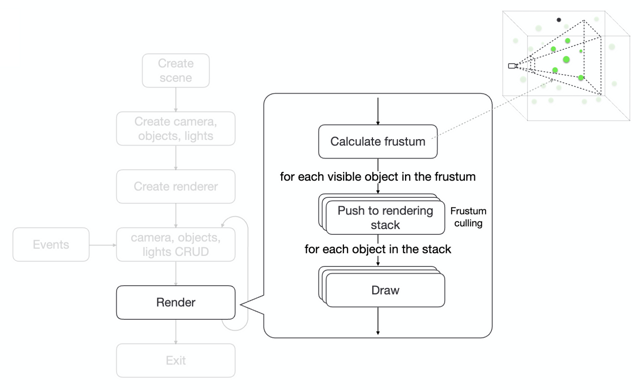
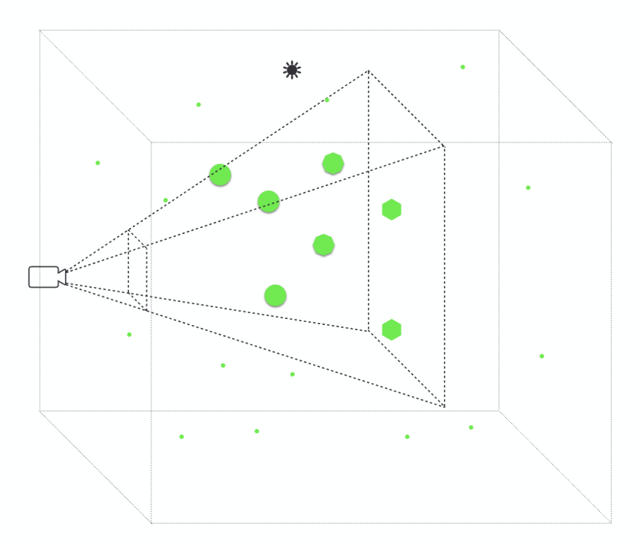
- Camera: the virtual viewpoint; where the user is standing and what direction they are looking. The frustum is the region of space that is visible to the camera. Frustum culling is the process of removing objects that are not visible to the camera.
- Lights: light sources that illuminate the scene; not all rendering modes need them, but they matter for realism
- Renderer: the engine that takes all of the above and draws pixels to the screen each frame
The program lifecycle is straightforward: init() creates the scene, animate() runs in a loop calling update() then render(), and destroy() cleans up GPU memory when the component is torn down. Almost all of the interesting work happens inside update() and inside the shaders that run on the GPU.
// pseudo-code for the concept
let scene, camera, obj, light, renderer;

function init() {
  scene = new THREE.Scene();
  camera = new THREE.PerspectiveCamera();
  obj = new THREE.Points();
  light = new THREE.HemisphereLight();
  renderer = new THREE.WebGLRenderer();
}

function render() {
  renderer.render(scene, camera);
}

function update() {
  obj.update();
  // update objects...
}

function animate() {
  requestAnimationFrame(animate); // loop
  update();
  render();
}

function destroy() {
  obj.dispose();
  // cleanup
}

init();
animate();
destroy();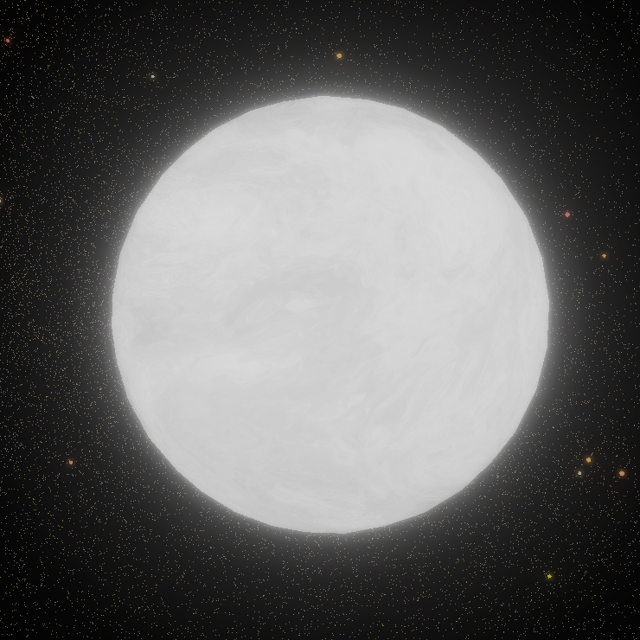
Mapping Data to 3D Space
Any dataset with at least three numerical dimensions can be plotted directly in 3D space by mapping three of its variables to x, y, and z coordinates. For a dataset with exactly three dimensions, the mapping is immediate. For datasets with more than three dimensions, three axes must be selected, either by choosing the most informative variables manually or by applying a dimensionality reduction technique such as Principal Component Analysis (PCA) or t-distributed Stochastic Neighbor Embedding (t-SNE), which compresses high-dimensional structure into three coordinates while preserving as much relational information as possible. The choice of reduction method is a domain-specific decision and is out of scope for this article, but the key point is that the rendering problem is the same regardless of how the coordinates were derived.
In this project, the dataset is synthetic: (x, y, z) positions distributed across a large cube, each assigned to a color group. The most intuitive way to render them is a simple loop, creating one sphere mesh per data point:
// pseudo-code for the concept
// For a 3D dataset, map directly to x, y, z
// For >3D datasets, reduce to 3D first (e.g. PCA, t-SNE), then do the same
const geometry = new THREE.SphereGeometry(radius);

for (const point of dataset) {
  const material = new THREE.MeshPhongMaterial({ color: point.color });
  const mesh = new THREE.Mesh(geometry, material);
  mesh.position.set(point.x, point.y, point.z);
  scene.add(mesh);
}
This works correctly for small datasets. At the scale of hundreds of thousands of points, however, this approach becomes the source of every performance problem described in the Challenges section: each sphere is its own scene graph object, each requires its own draw call, and each must be tested individually against the camera frustum every frame. I’ll introduce how to overcome these limitations in the next section.
Zoom and Navigation
The second requirement from the Goal section calls for a continuous zoom experience that lets the viewer move between a macro view of the entire distribution and a micro view of individual clusters. Three.js’s OrbitControls provides this out of the box, binding mouse scroll (or pinch on touch devices) to camera zoom and handling orbit and pan as well.
The critical configuration is the zoom range. With minDistance = 3 and maxDistance = 24000, the camera can pull back far enough to see the entire 1M-point cloud as a compact galaxy, or close enough that individual sphere-rendered points fill the screen. Each camera movement triggers a recalculation of which points fall within the frustum and at which level of detail, connecting user input directly to the LOD system described in the Challenges section:
// pseudo-code for the concept
import { OrbitControls } from 'three/addons/controls/OrbitControls.js';

const controls = new OrbitControls(camera, renderer.domElement);
controls.minDistance = 3;      // zoom in: individual points fill the screen
controls.maxDistance = 24000;  // zoom out: entire dataset visible at once

// Re-run frustum culling whenever the camera moves
controls.addEventListener('change', () => {
  frustumCuller.cull(); // recompute visible points and LOD tiers
});
The result is the core of the immersive experience: the viewer can sense the scale of the full dataset from a distance, then navigate into it and feel surrounded by data.
Interactivity via Raycasting
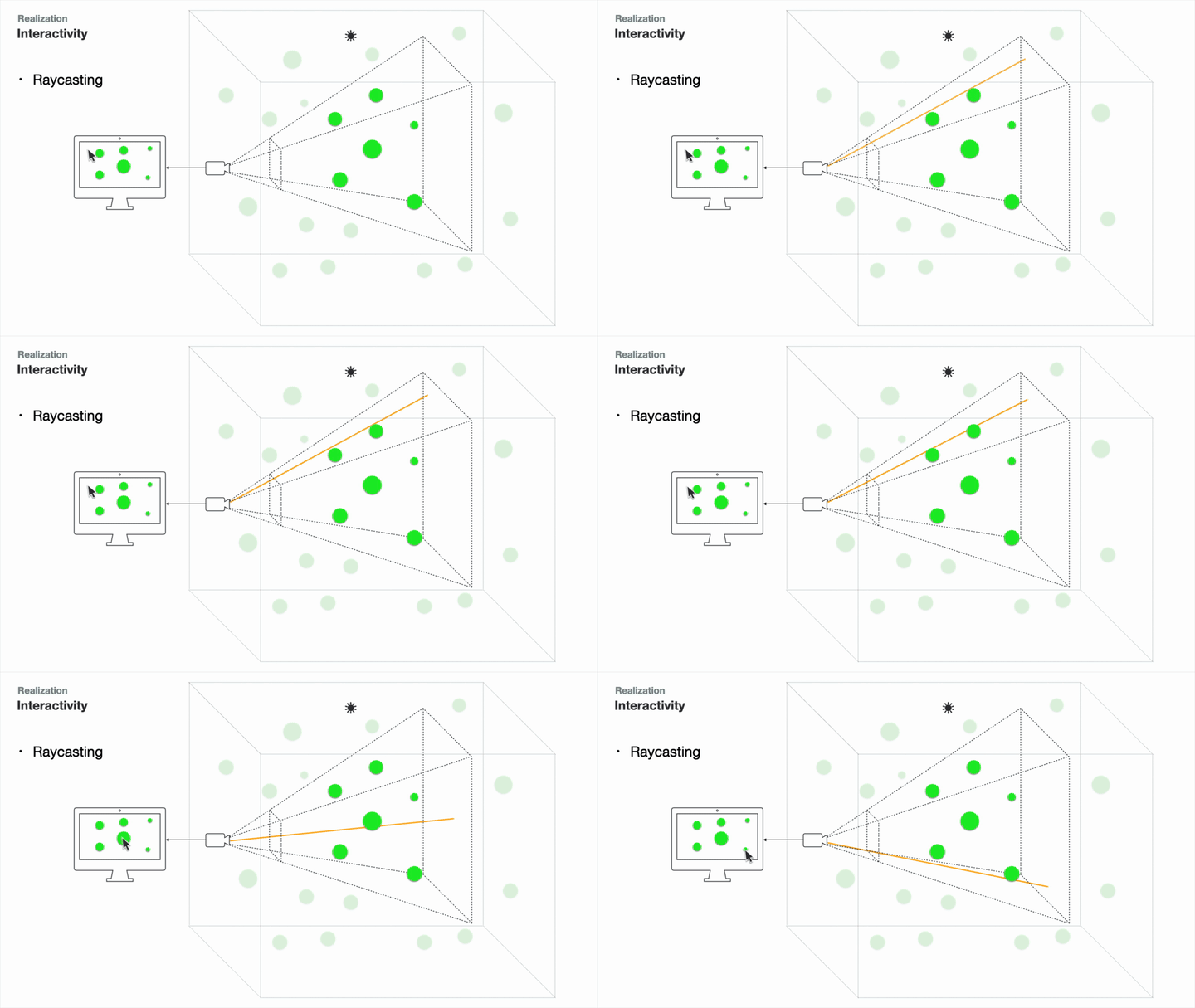
In a standard web page, click and hover events are handled automatically by the browser. In a 3D scene, the situation is more involved: a mouse position is only a 2D coordinate on screen, which by itself says nothing about which 3D object the cursor is over. The same screen position could map to dozens of objects at different depths in the scene.
The solution is raycasting: cast a virtual ray from the camera through the cursor’s screen position and collect all the scene objects it intersects, ordered by distance. The closest intersection is what the user is pointing at. Three.js provides a built-in Raycaster for this:
// pseudo-code for the concept
import * as THREE from 'three'

const raycaster = new THREE.Raycaster()
const mouse = new THREE.Vector2()

function onMouseMove(event: MouseEvent) {
  // Normalize mouse position to -1..1
  mouse.x = (event.clientX / window.innerWidth) * 2 - 1;
  mouse.y = -(event.clientY / window.innerHeight) * 2 + 1;

  raycaster.setFromCamera(mouse, camera);

  const intersects = raycaster.intersectObjects(scene.children);
  if (intersects.length > 0) {
    // intersected is sorted by distance; [0] is the closest hit
    const first = intersects[0];
    console.log('You are hovering over', first.object.name);
  }
}
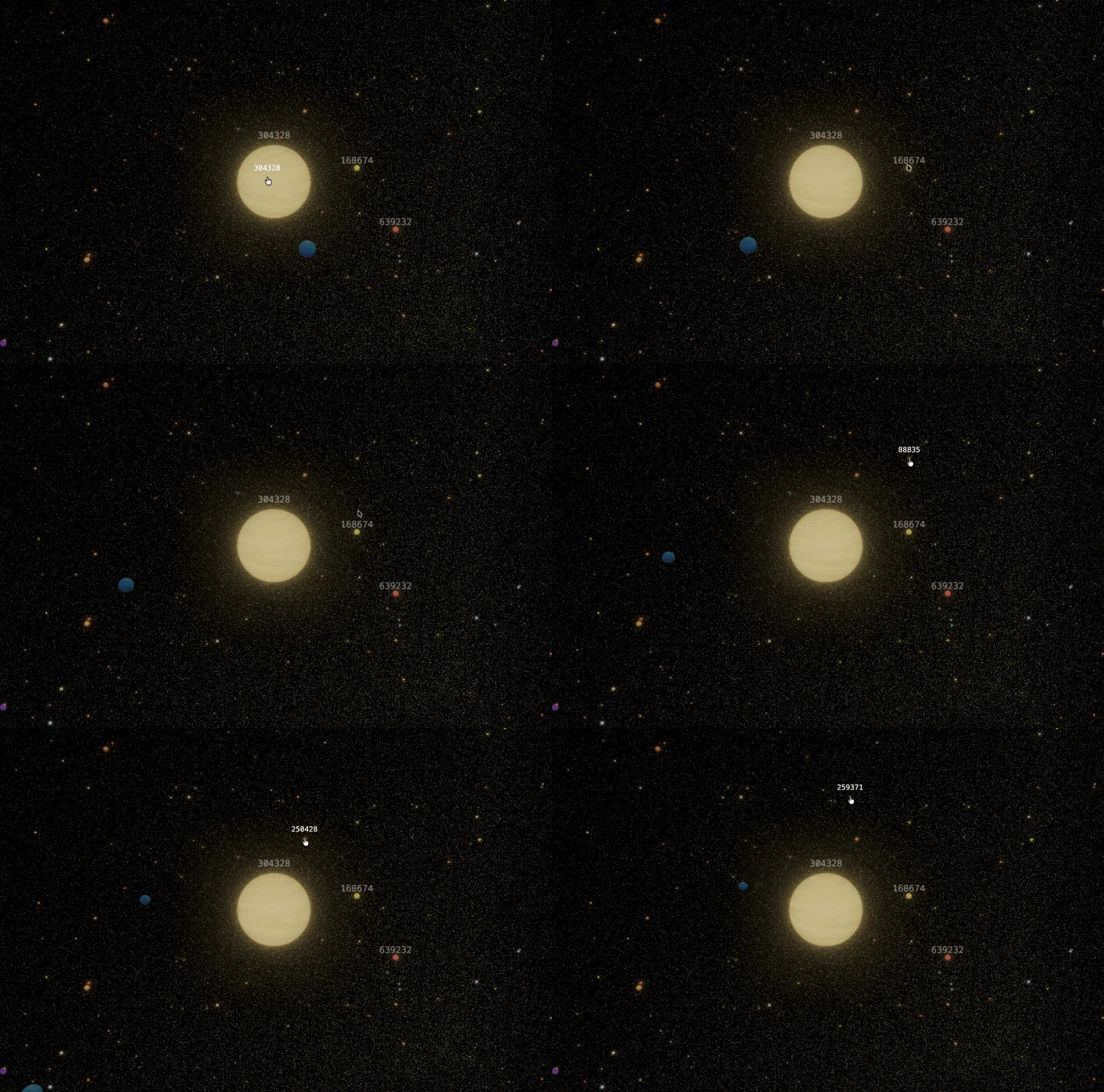
This provides hover and click detection on any object in the scene, regardless of depth, using the same intuition as pointing at a physical object.
Dynamic Visual Effects with GPU Shaders
To encode additional dimensions of the dataset visually, dynamic effects can be applied to each data point. For instance, rotation speed might represent a variable’s magnitude, while color encodes its category. The goal is to make multiple variables readable at a glance, without adding more axes.
The challenge is doing this for a million points at 60 frames per second. A standard CPU-driven loop iterates over each point sequentially, updates it, and uploads the result to the GPU once per frame. At this scale, the loop itself becomes the bottleneck. The CPU is well suited for serial execution of complex logic, but it processes one operation at a time, and a million sequential updates is simply too much to finish within a 16-millisecond frame budget.
The GPU is built on a different principle. It executes thousands of simple operations simultaneously, in parallel. When per-point logic can be expressed as a short, stateless program, the GPU applies it to every point in the scene at once. This is what shaders are for.
WebGL exposes two stages of the rendering pipeline that accept custom code:
- Vertex shaders: run once per vertex, control geometry and position
- Fragment shaders: run once per pixel, control color and appearance
These are written in GLSL, a C-like language that executes entirely on the GPU. A uniform such as u_time, incremented each frame, enables animations that run at full GPU speed without any CPU involvement:
// pseudo-code for the concept
uniform vec2 u_resolution;
uniform float u_time;

void main() {
  vec2 st = gl_FragCoord.xy / u_resolution;
  gl_FragColor = vec4(st.x, st.y, abs(sin(u_time)), 1.0);
}
Sites like Shadertoy offer a useful reference for what becomes possible when this model is fully embraced.
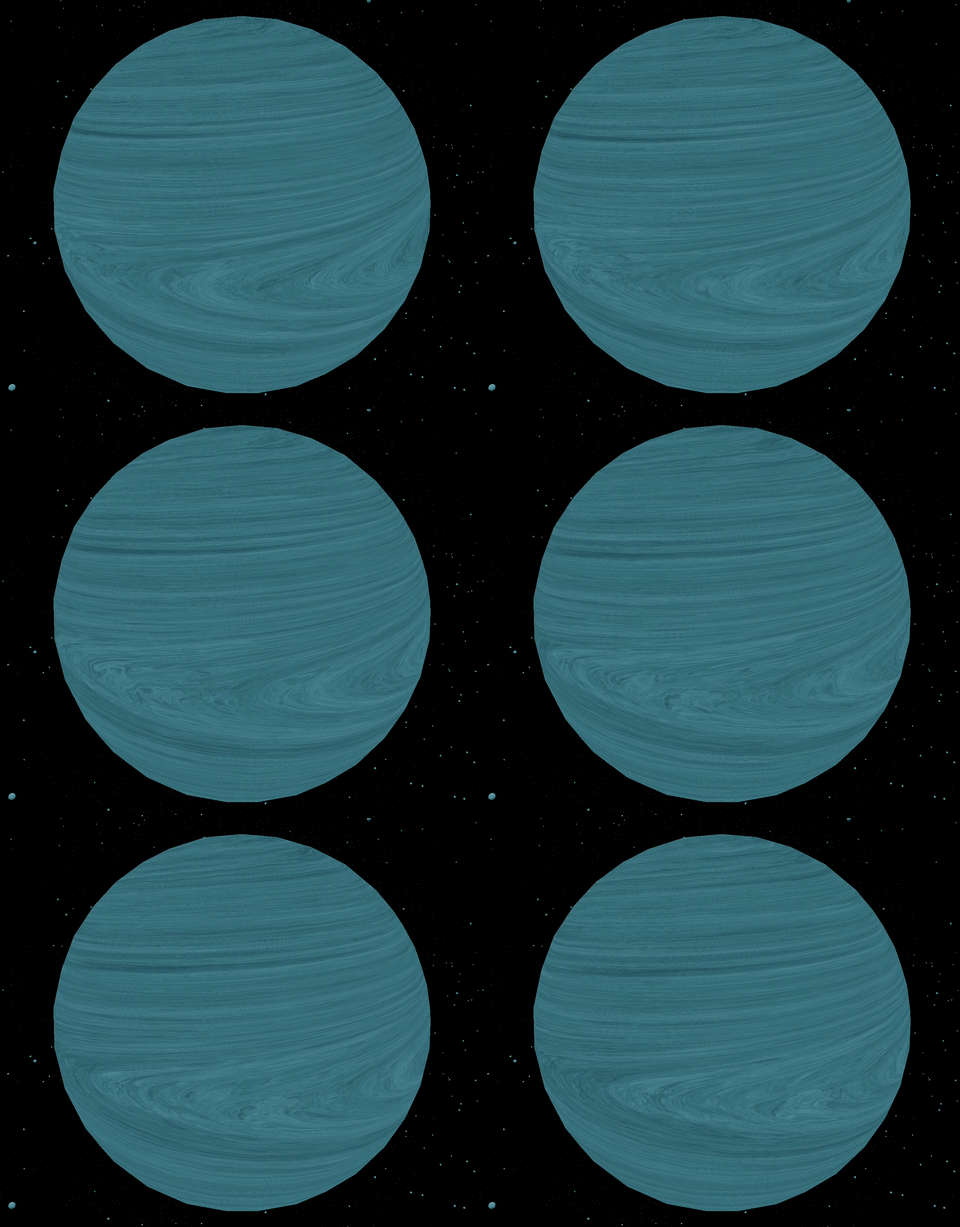
In this project, I implemented the differential rotation shader to create a Jupiter-like effect for each data point, where different latitudinal bands of the sphere rotate at different speeds, producing a swirling, organic visual.
// pseudo-code for the concept
// uniforms from js
uniform float uTime;
uniform float uSpeed;
uniform vec3 uColor;
uniform float uDiffRotationCA;
uniform float uDiffRotationCB;
uniform float uDiffRotationCC;

// varyings from vertex shader
varying vec3 vPosition;
varying vec3 vNormal;
varying vec2 vUv;

// Differential rotation
float diffRotationSpeed(vec3 point, float A, float B, float C) {
  vec3 equator = vec3(0.0, 1.0, 0.0);
  float cosFactor = dot(point, equator) / (length(point) * length(equator)); // use cosine to replace sine
  return radians(A) + radians(B) * (1.0 - pow(cosFactor, 2.0)) + radians(C) * pow((1.0 - pow(cosFactor, 2.0)), 2.0);
}

// sun-like
void main() {
  vec3 color = vec3(0.0);
  vec3 st = vPosition.xyz;

  float speed = uTime * uSpeed * diffRotationSpeed(st, uDiffRotationCA, uDiffRotationCB, uDiffRotationCC);

  // self-rotation
  st = rotate(st, vec3(0.,1.,0.), speed);

  // ... other effects

  gl_FragColor = vec4(customRGB, 1.0);
}
Selective Bloom
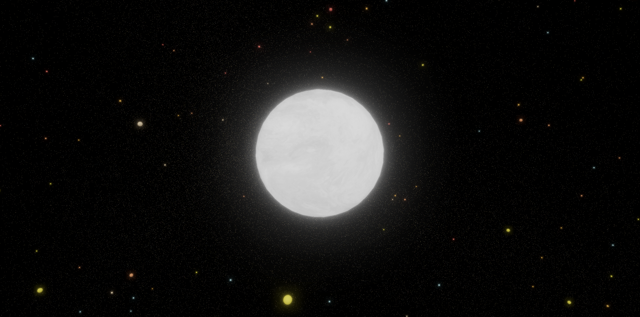
The shader produces the right movement, but there is one more aesthetic touch worth adding. In space photography and rendered 3D scenes, luminous objects bleed light into the surrounding space, producing a soft glow rather than a hard edge. A planet viewed through a telescope does not look like a crisp sphere; it radiates. The scene is perfectly renderable without this effect, but adding it transforms a technically correct sphere into something that feels luminous and alive. It is the finishing detail that makes the difference between a visualization and a view.
Three.js’s post-processing system works by re-rendering the already-finished scene through a stack of effect passes, similar to applying filters to a photograph after it is taken. Bloom, the glowing effect around bright objects, is one of the most visually impactful post-processing effects. The built-in UnrealBloomPass is the one I use here.
The problem is that post-processing passes are applied to the entire scene uniformly, with no built-in mechanism for selective per-object bloom control. Applying bloom globally washes out everything and destroys the visual hierarchy.
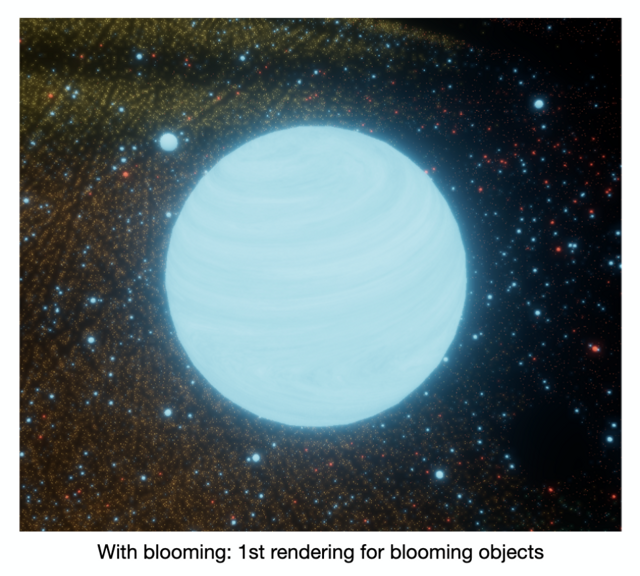
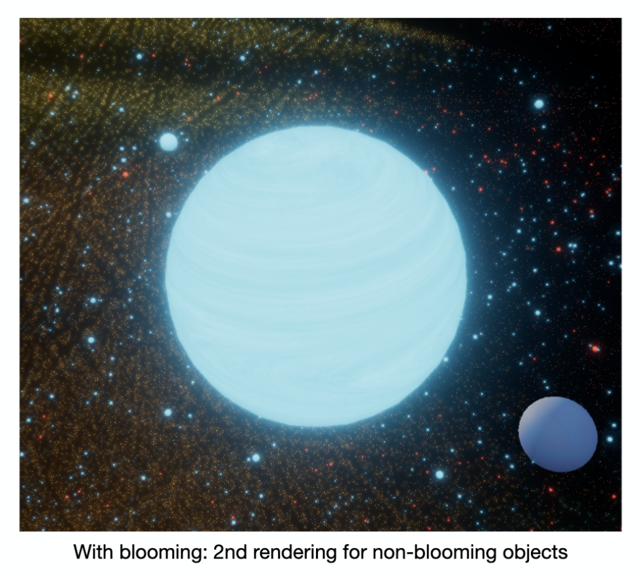
The workaround is a two-pass render:
- Render only the objects that should bloom, apply the
UnrealBloomPass, write to a separate render target - Render only the objects that should not bloom, with no post-effect
The two render targets are then composited using a custom ShaderPass that blends them together:
// pseudo-code for the concept
// SETUP
const bloomLayer = new Layer(1)        // a flag to mark "should glow"
const darkMaterial = new SolidBlackMaterial()
const bloomPass = new UnrealBloomPass({ strength, radius, threshold })
const bloomComposer = new EffectComposer(renderer) // first composer
bloomComposer.renderToScreen = false   // outputs to texture, not screen
bloomComposer.addPass(renderScene)
bloomComposer.addPass(bloomPass)

const mixPass = new ShaderPass({
  uniforms: {
    baseTexture:    { value: null },
    bloomTexture:   { value: bloomComposer.outputTexture },
    bloomIntensity: { value: 1.0 },
  },
  // fragment shader: output = base + bloom * intensity
})

const finalComposer = new EffectComposer(renderer)  // second composer
finalComposer.addPass(renderScene)
finalComposer.addPass(mixPass)

// TAGGING OBJECTS
add(object) {
  object.layers.enable(bloomLayer)   // mark it for bloom
}

remove(object) {
  object.layers.disable(bloomLayer)  // unmark it
}


// RENDER (called every frame)
render() {
  // Step 1: darken everything that should NOT glow
  const savedMaterials = {}
  scene.traverse((obj) => {
    if (!bloomLayer.test(obj.layers)) {
      savedMaterials[obj.id] = obj.material
      obj.material = darkMaterial    // or obj.visible = false
    }
  })

  // Step 2: render bloom-only pass into a texture
  bloomComposer.render()

  // Step 3: restore the scene
  scene.traverse((obj) => {
    if (savedMaterials[obj.id]) {
      obj.material = savedMaterials[obj.id]
    }
})

  // Step 4: final render — ShaderPass blends base + bloom texture
  finalComposer.render()
}
It requires maintaining two EffectComposer instances and manually managing which objects are visible in which pass. The result is fine-grained, per-object bloom control: glowing spheres glow, and nothing else does.
Challenges & Optimization
While the above techniques are conceptually sound, applying them naively to a large-scale dataset of over one million samples would be problematic: excessive memory consumption, unnecessary computation, low frame rates, and consequently a poor user experience.
Profiling revealed four distinct bottlenecks:
- Too many objects in the scene graph
- Too many draw calls to the GPU
- Expensive frustum testing: determining which objects fall inside the camera’s view volume
- Unnecessary geometry complexity: rendering detailed meshes for objects that are far away
Each required its own solution, and they compose together.
1. Reducing Objects: Points
The first step was to replace the per-sphere loop with a single Points primitive, which renders all vertices as one scene graph object with one draw call, eliminating the per-object overhead described above. It is not sufficient on its own, however: when zooming in close, flat sprites look wrong and real 3D geometry is still required. For distant points, Points is adequate, as individual data points are indistinguishable at that range.
// pseudo-code for the concept
// before
for (point of data) {
  // this is slow
  scene.add(new THREE.Mesh(sphereGeo, material));
}

// after
const points = new THREE.Points(sphereGeo, material);
scene.add(points);
2. Reducing Geometry Complexity: LOD
For points close to the camera, real 3D geometry is still required. However, geometry complexity can be managed based on distance from the camera. Points within 150 units receive the HD mesh (along with a label sprite); between 150 and 300 units, the SD mesh; between 300 and 600 units, the LD mesh; and beyond 600 units, the flat Points primitive covers them. This is the application of Level of Detail (LOD), which renders cheaper geometry for objects where the detail would be invisible anyway.
Recall that the naive sphere-per-point loop in the Mapping Data to 3D Space section used SphereGeometry, a UV sphere that distributes vertices by latitude and longitude, producing dense clusters at the poles and a coarser band at the equator. For LOD purposes this is a poor fit: the vertex count cannot be reduced in meaningful coarse steps, and even its cheapest configuration carries more geometry than necessary. IcosahedronGeometry solves both problems. It subdivides the faces of a regular icosahedron uniformly, giving a near-even vertex distribution across the surface. More importantly, its detail parameter directly controls the face count in predictable steps: detail 0 gives 20 faces, detail 1 gives 80, and detail 2 gives 320. This makes it straightforward to define three distinct quality tiers with a single integer, which maps cleanly onto the HD, SD, and LD levels below.
// pseudo-code for the concept
// Distance thresholds (squared, to avoid sqrt per point)
const HD_DIST_SQ = 150 * 150; // high-detail radius
const SD_DIST_SQ = 300 * 300; // standard-detail radius
const LD_DIST_SQ = 600 * 600; // low-detail radius
                              // beyond LD → already covered by Points

type LODTier = 'HD' | 'SD' | 'LD' | 'NONE';

// Each mesh tier uses the same base shape at a different subdivision level
const LOD_GEOMETRY: Record<Exclude<LODTier, 'NONE'>, THREE.IcosahedronGeometry> = {
  HD: new THREE.IcosahedronGeometry(radius, 2), // 320 faces
  SD: new THREE.IcosahedronGeometry(radius, 1), //  80 faces
  LD: new THREE.IcosahedronGeometry(radius, 0), //  20 faces
};

// Called every frame inside update()
function assignLOD(point: Vector3, camera: Camera): LODTier {
  const distSq = point.distanceToSquared(camera.position);

  if (distSq < HD_DIST_SQ) {
    return 'HD';   // close: full-detail icosahedron + label
  } else if (distSq < SD_DIST_SQ) {
    return 'SD';   // mid-range: reduced icosahedron, no label
  } else if (distSq < LD_DIST_SQ) {
    return 'LD';   // far: lowest-poly icosahedron
  } else {
    return 'NONE'; // too far: skip mesh, already rendered as a Point
  }
}
3. Reducing Draw Calls with Instancing
A draw call is a command issued from the CPU to the GPU to render a piece of geometry. Every mesh is an object in the scene graph, and whenever it is in the frustum and should be rendered, it invokes a draw call. However, even with optimized shaders and geometries, too many draw calls can overwhelm the GPU, leading to performance degradation.
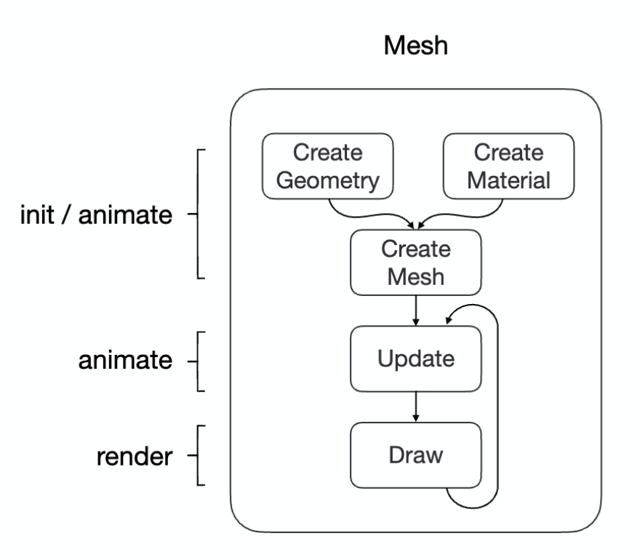
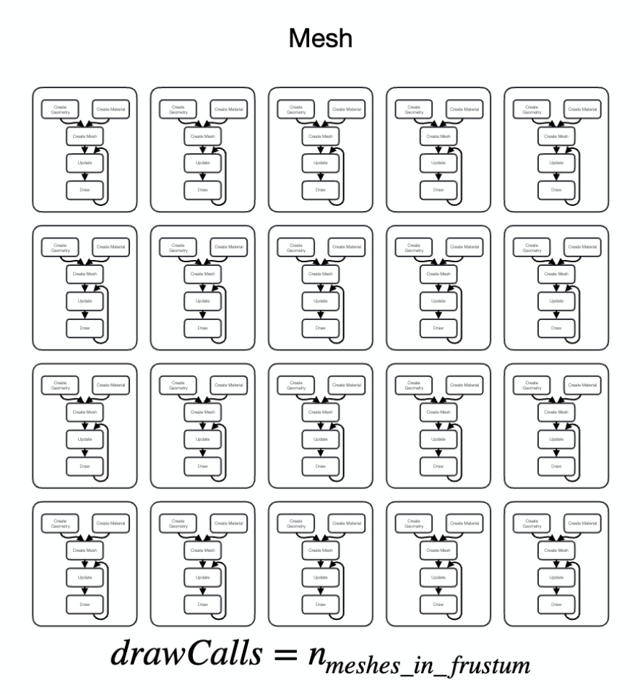
The solution is to render multiple objects using a single draw call, which is achieved through instancing. In Three.js, instancing is implemented through InstancedMesh. It lets you define a mesh once (geometry + material), then render any number of instances of it using a per-instance transformation matrix, all in a single draw call. Per-instance attributes such as color and transform can still be varied independently, while the draw call count remains fixed at one per mesh type.
Here is an illustration of the concept:
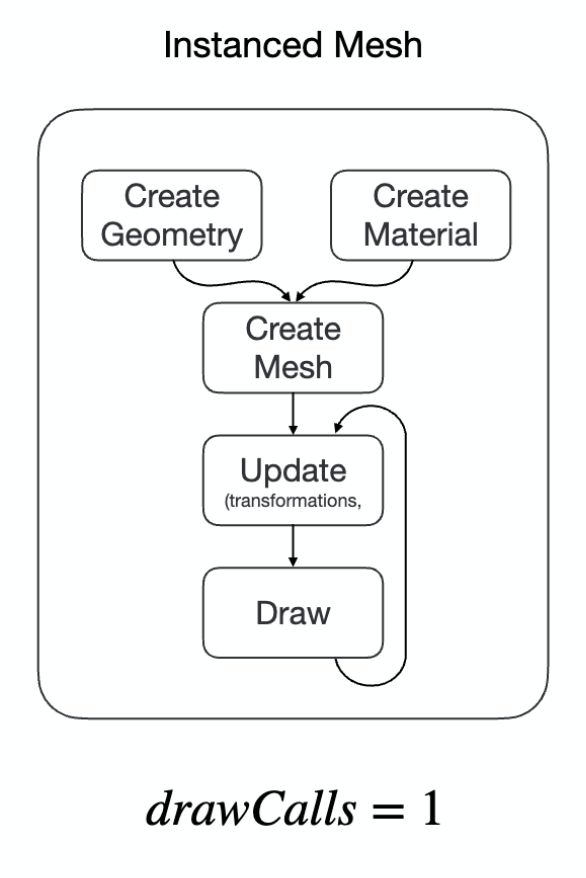
Combining instancing with LOD, Escaping Flatland maintains three separate InstancedMesh objects for HD, SD, and LD detail levels, each backed by an icosahedron at a different subdivision level:
// pseudo-code for the concept
// One InstancedMesh per LOD tier, each with a different subdivision level
const hdMesh = new THREE.InstancedMesh(
  new THREE.IcosahedronGeometry(radius, 2), material, MAX_COUNT // 320 faces
);
const sdMesh = new THREE.InstancedMesh(
  new THREE.IcosahedronGeometry(radius, 1), material, MAX_COUNT //  80 faces
);
const ldMesh = new THREE.InstancedMesh(
  new THREE.IcosahedronGeometry(radius, 0), material, MAX_COUNT //  20 faces
);

// Called every frame inside update()
function updateInstances(points: Vector3[], camera: Camera) {
  let hdCount = 0, sdCount = 0, ldCount = 0;

  for (const point of points) {
    const tier = assignLOD(point, camera); // from the previous section

    if (tier === 'HD') {
      setInstanceMatrix(hdMesh, hdCount++, point);
    } else if (tier === 'SD') {
      setInstanceMatrix(sdMesh, sdCount++, point);
    } else if (tier === 'LD') {
      setInstanceMatrix(ldMesh, ldCount++, point);
    }
    // tier === 'NONE' → skip; already visible as a flat Point
  }

  // Only draw the instances we actually populated
  hdMesh.count = hdCount;
  sdMesh.count = sdCount;
  ldMesh.count = ldCount;
}
The optimization strategy is as follows: on every frame, the instanced meshes are rendered with the appropriate detail level for each point, depending on the camera distance. The high-detail meshes are rendered only when the camera is close to the points, the low-detail meshes when the camera is far away, and Points covers everything beyond the culling range.
Labels as Instanced Sprites
Labeling the nearest data points introduces the same draw-call problem in a different form. The instinctive approach is to attach a DOM element to each HD-tier point using CSS2DObject, Three.js’s built-in facility for overlaying HTML on a 3D scene. For a small number of objects this is workable; for 128 labels per frame, each a live DOM node that the browser must lay out and composite on top of the WebGL canvas, the overhead adds up. More fundamentally, CSS2DObject does not compose with instancing at all: instanced mesh slots are bare matrix entries in a GPU buffer with no corresponding scene graph objects, so there is nothing for a DOM node to follow.
The solution applies the same instancing principle to the labels themselves. All label text needed in a given frame is packed into a single texture atlas: a canvas element subdivided into a fixed grid of cells, each cell holding one label rendered with the Canvas 2D API. The vertex shader computes each instance’s UV offset into the atlas directly from gl_InstanceID, so each instance samples only its own cell from the shared texture. The label plane itself is a billboard, kept facing the camera at all times by the vertex shader, scaled to a constant screen size regardless of depth, and offset upward in view space so it floats visibly above its data point.
The result is a single InstancedMesh that renders all visible labels in one draw call, sharing the same 128-slot budget as the HD-tier geometry. Every frame, the culler writes label text alongside instance matrices, the canvas is redrawn, and the whole batch is sent to the GPU at once.
// pseudo-code for the concept
// Pack all label text into one canvas, subdivided into cells
const canvas = document.createElement('canvas');
const ctx = canvas.getContext('2d');
for (let i = 0; i < labels.length; i++) {
  const col = i % gridW;
  const row = Math.floor(i / gridW);
  ctx.fillText(labels[i], (col + 0.5) * cellW, (row + 0.5) * cellH);
}
const atlasTexture = new THREE.CanvasTexture(canvas);

// In the vertex shader, gl_InstanceID selects the right atlas cell:
// vUv = (vec2(col, row) + uv) * vec2(1.0/gridW, 1.0/gridH);

// One InstancedMesh covers all labels in a single draw call
const labelMesh = new THREE.InstancedMesh(planeGeometry, atlasMaterial, MAX_HD_COUNT);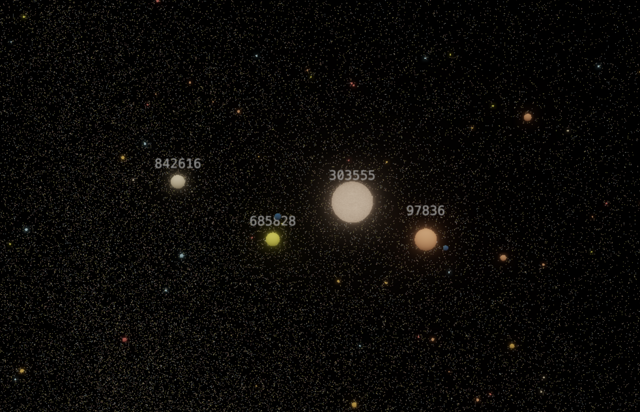
4. Reducing Frustum Testing: Octree
Even with InstancedMesh, deciding which points to render with appropriate LOD on every frame was too slow. Testing each of 1M points against the camera frustum linearly is O(n) and it shows.
The solution is a spatial data structure: an Octree.
Octrees are hierarchical tree structures that recursively partition 3D space into eight octants. They are a natural fit for 3D point data, but they generalize cleanly to higher dimensions. In 2D the equivalent structure is a quadtree (four quadrants), and the pattern follows the rule of 2^N partitions per level for N dimensions.
I used a sparse Octree from the sparse-octree library, which is a space-efficient implementation of an Octree that only stores nodes that contain points. However, the core logic is simple:
// pseudo-code for the concept
// The bounding box is the smallest cube that contains all the points in the node.
// If the node is a leaf, it contains the points.
// If the node is not a leaf, it contains eight children, each of which is an OctreeNode.
// Recursive node structure
interface OctreeNode {
  bounds: BoundingBox;
  points: Point[];
  children?: OctreeNode[];
}

// Insert a point
function insert(node: OctreeNode, point: Point) {
  // If node is full and not a leaf, subdivide
  if (node.points.length > MAX_POINTS_PER_NODE && !node.children) {
    subdivide(node);
  }

  // If node is a leaf, add the point
  if (!node.children) {
    node.points.push(point);
    return;
  }

  // Otherwise, insert into the correct child
  const childIndex = getChildIndex(node, point);
  insert(node.children[childIndex], point);
}
Instead of testing every point, the tree is traversed and entire subtrees that do not intersect the frustum are pruned. The visible points needed are at the leaves of the intersecting octants.
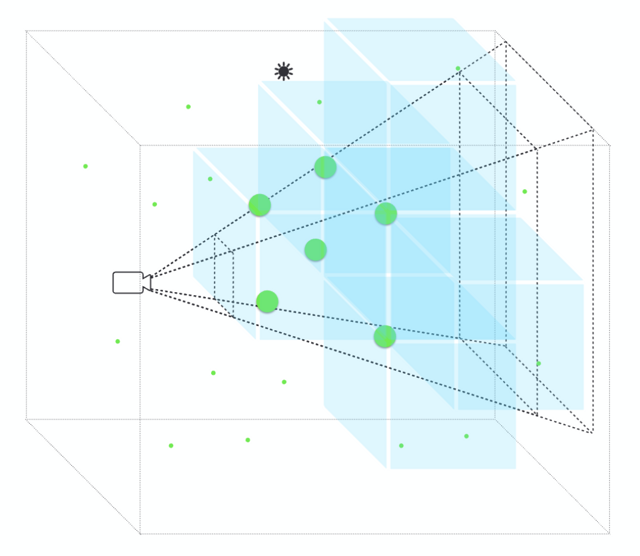
There is also a second trick worth noting, and the reason behind it is non-obvious. Each InstancedMesh has a fixed maximum instance count allocated at construction time: 128 slots for HD, 128 for SD, and the remainder for LD. The culling loop fills these slots in ascending distance order, so the closest points always take priority. The problem arises when more points fall inside the frustum than the total slot budget allows. Without a far-plane restriction, the LD slots could be exhausted by distant points, leaving nearby points that should legitimately be rendered as HD or SD meshes with no slot to occupy. The result would be close-up points vanishing silently whenever the camera zooms out even slightly.
The solution is to use a second, truncated frustum just for the culling process, whose far plane is set much closer than the actual camera far plane. Only points within this tighter volume are ever considered for instanced mesh rendering at all. Because the loop processes octants in ascending distance order within this bounded frustum, the nearest points always claim their slots first, and the fixed instance budgets are never wasted on geometry too far away to matter.
// In FrustumCuller.cull():
const cullCamera = this.cullCamera.clone();
cullCamera.far = this.frustumFar; // shorter than actual camera.far
cullCamera.updateProjectionMatrix();
frustum.setFromProjectionMatrix(m.multiplyMatrices(
  cullCamera.projectionMatrix,
  cullCamera.matrixWorldInverse
));
const intersections = this.octree.cull(frustum);
Here is a demo that shows how it works:
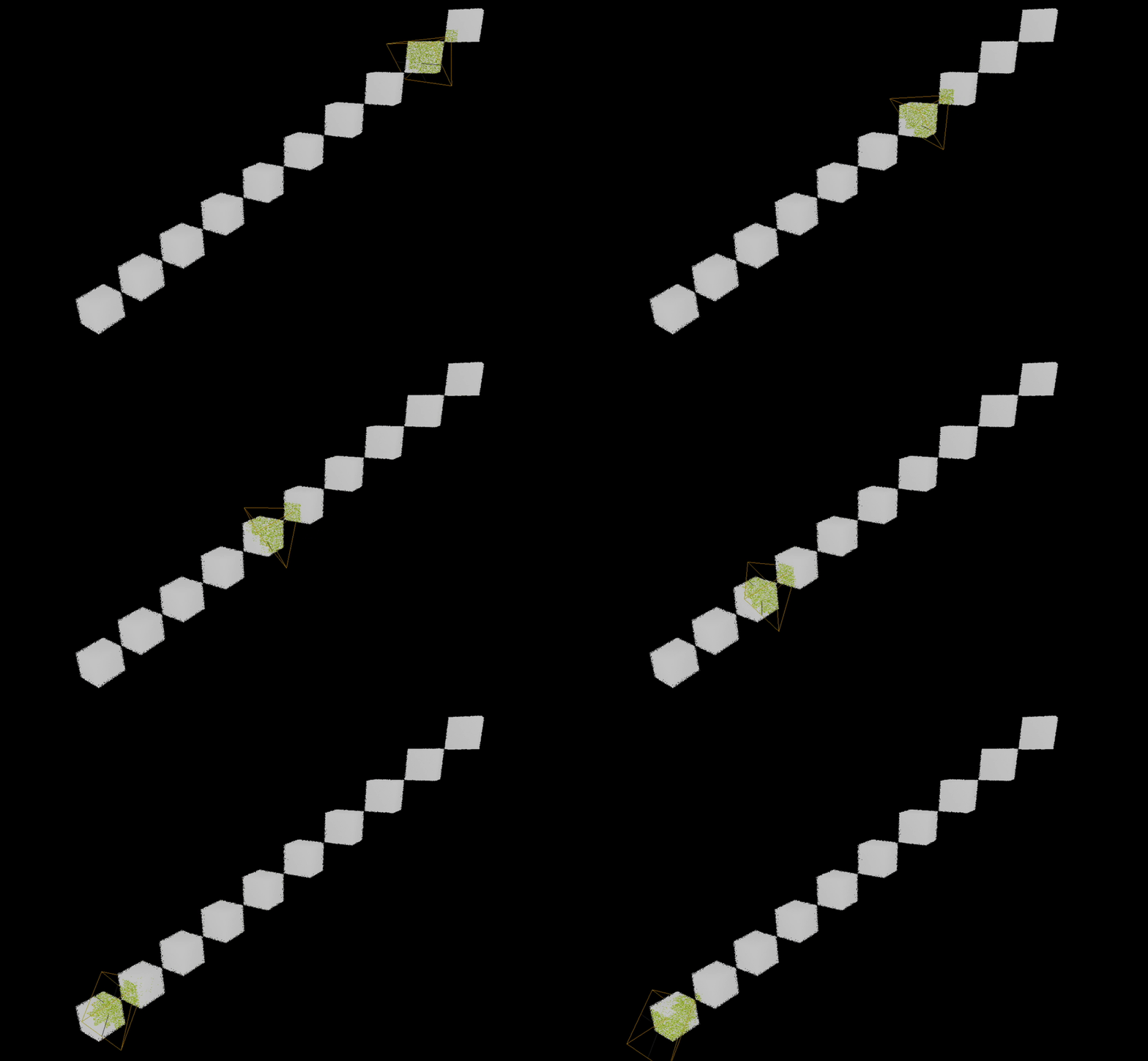
In the demo, each point is a member of an octant, and when a frustum intersects an octant, all the points in that octant are potentially visible (marked green) and can simply be made visible. Further testing the distance between the camera and the bounding box of the octant then determines which level of detail to render for the points within it.
Summary
The full optimization stack, stacked in layers:
| Problem | Solution |
|---|---|
| Too many scene objects | Points: all distant points as one object |
| Too many draw calls | InstancedMesh: one draw call per LOD tier |
| Labels on instanced geometry | InstancedLabelSprites: texture atlas, one draw call for all visible labels |
| Expensive frustum testing | Octree: logarithmic spatial pruning |
| Unnecessary geometry | Three-tier LOD: detail budget scales with distance |
Together, these bring the frame rate above 60 FPS on an average machine with one million points in the scene.
Pitfalls
Not everything in this project went according to plan. Two bugs in particular were difficult to diagnose, and both turned out to reveal something non-obvious about how Three.js works internally. They are worth documenting here.
Stale Bounding Spheres on InstancedMesh
The symptom was subtle: entire groups of instanced meshes would disappear at certain camera angles, and raycasting against them would silently miss even when the cursor was clearly over a point. Both issues traced back to the same root cause.
Three.js computes a bounding sphere for every mesh object, which it uses in two places: its own frustum culling test (to skip rendering objects outside the camera’s view), and the Raycaster’s early rejection test (to skip intersection math when the ray cannot possibly hit the object). For a static mesh the bounding sphere is computed once and stays valid. For an InstancedMesh whose instance matrices are rewritten every frame, the bounding sphere becomes stale the moment the instances move. When the culler updates 128 HD instance positions but the mesh still reports a bounding sphere derived from the previous frame’s layout, Three.js may conclude the entire mesh is off-screen and skip it completely, taking both rendering and raycasting with it.
The fix has two parts. First, Three.js’s built-in mesh-level frustum culling is disabled on all instanced meshes (frustumCulled = false), since the culler already handles per-point frustum testing manually and the mesh-level test adds nothing but a source of false negatives. Second, computeBoundingSphere() is called after instance matrices are written each frame, so the sphere the raycaster consults reflects the actual current layout rather than a stale snapshot.
// pseudo-code for the concept
// Disable Three.js's own frustum cull — we handle it manually
hdMesh.frustumCulled = false;
sdMesh.frustumCulled = false;
ldMesh.frustumCulled = false;

// Inside cull(), AFTER writing instance matrices:
hdMesh.instanceMatrix.needsUpdate = true;
hdMesh.computeBoundingSphere(); // keep raycaster in sync
Blinking Particles under Selective Bloom
Once the selective bloom post-processing was working correctly for the planet meshes, a different artifact appeared: background particles would blink in a shimmer pattern whenever the camera moved near objects that had bloom enabled. The effect was consistent and frame-rate-dependent, which pointed toward something toggling between the two render passes rather than a one-time initialization problem.
The selective bloom implementation works by traversing the scene before the bloom pass and darkening everything that should not glow, rendering the bloom result into a texture, then restoring the scene and compositing. For Mesh objects, darkening means swapping the material for a solid black MeshBasicMaterial. The problem was applying that same swap to Points objects. Assigning a MeshBasicMaterial to a Points object does not make it invisible: Three.js renders the points as 1-pixel dots that still write to the depth buffer. With hundreds of thousands of background particles, some of those depth-writing dots would happen to align with bloom-layer geometry as the camera moved. In the bloom composer pass those dots depth-occluded the geometry behind them; in the final composer pass, where the original PointsMaterial has depthWrite disabled, they did not. The bloom contribution for those pixels toggled from one pass to the other, producing a frame-by-frame flicker.
The fix is to treat Points objects the same way InstancedLabelSprites were already being treated: hide them entirely during the bloom pass (visible = false) rather than swapping their material. This removes them from depth testing altogether, so they have no effect on what the bloom composer sees.
// pseudo-code for the concept
scene.traverse((obj) => {
  if (!bloomLayer.test(obj.layers)) {
    if (obj.isPoints || obj.isInstancedLabelSprites) {
      // Hide entirely — swapping material leaves depth-writing dots
      obj.visible = false;
      hiddenObjects.push(obj);
    } else if (obj.isMesh) {
      // Safe to darken: mesh material swap works correctly
      savedMaterials[obj.uuid] = obj.material;
      obj.material = darkMaterial;
    }
  }
});
What This Actually Looks Like
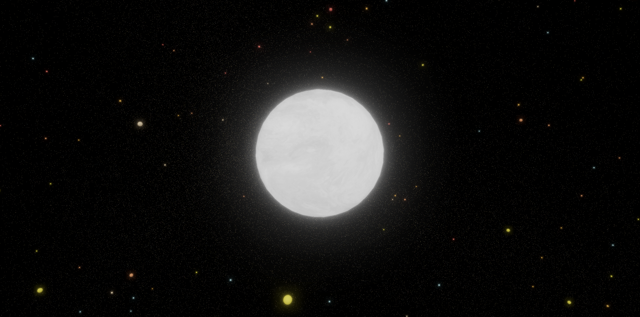
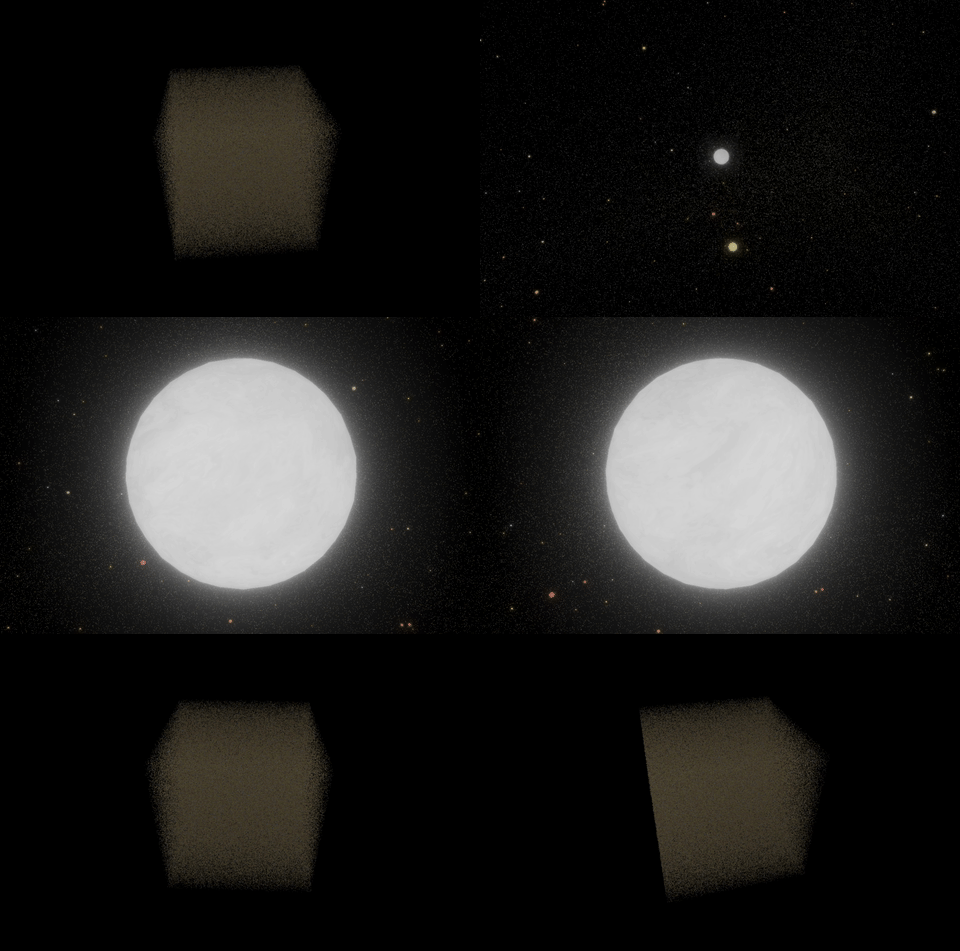
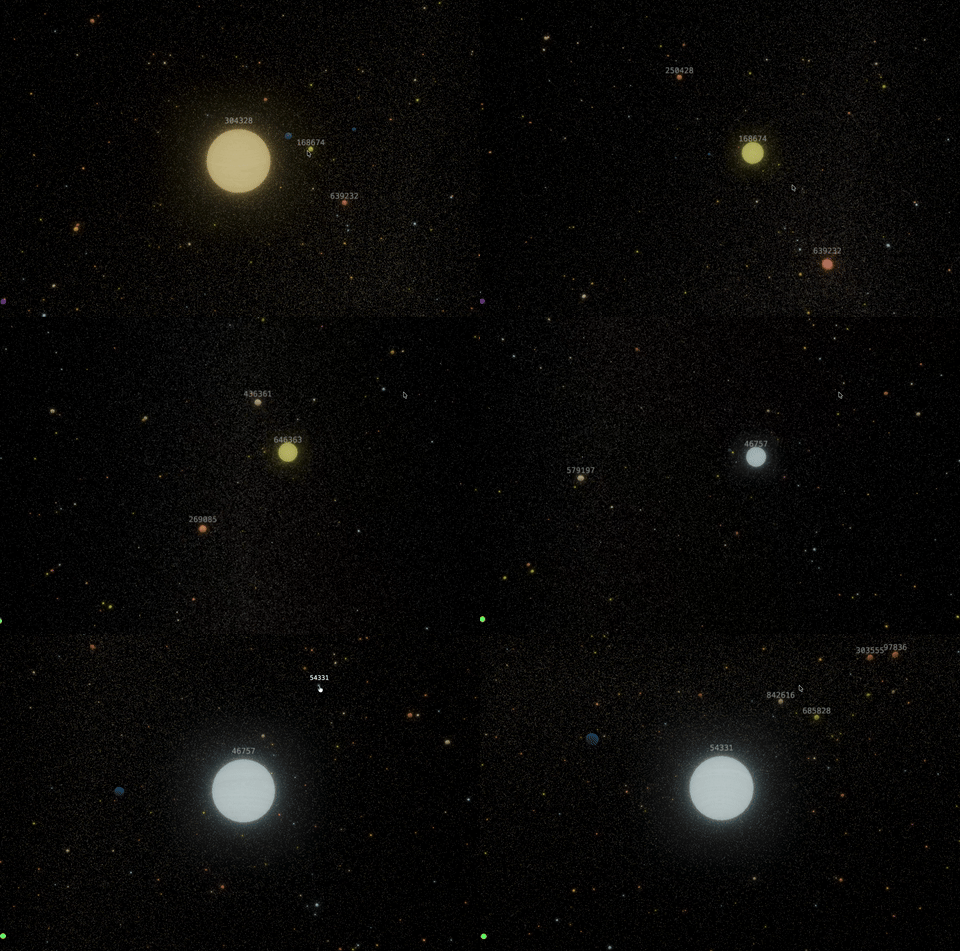
The demo renders a galaxy-like cloud of 1M random points, grouped by color into clusters. At the macro scale, the full distribution is visible at once. As the camera zooms in, the flat sprites resolve into proper 3D spheres with labels attached. The transition is smooth because the Octree culling and InstancedMesh swapping happen fast enough to stay within a frame budget.
The data is deliberately synthetic. The point was never the dataset; it was the rendering pipeline. The same architecture can be adapted to any large point cloud: geographic data, scientific simulations, network graphs in 3D space.
Live Demo
Try the live demo!
Closing Thoughts
The path from “I want a 3D chart” to “I have a 3D chart that runs at 60 FPS with one million points” passes through shader programming, spatial data structures, and GPU memory management. None of that is especially exotic. Three.js, the sparse-octree library, and the WebGL post-processing pipeline are all well-documented. But it is a different class of problem than building a chart on top of D3.
Tufte was right that escaping flatland is the essential task. What has changed since 1990 is that the escape route is now a JavaScript file and a browser.